Can't Reproduce: 5 Things Every Bug Report Loses on the Way to a Developer
"Cannot reproduce" closes tickets, not bugs. Here are the 5 things bug reports lose on the way to a developer, and a 7-point check to stop it.
Every developer has typed it. Every tester has received it.
"Cannot reproduce."
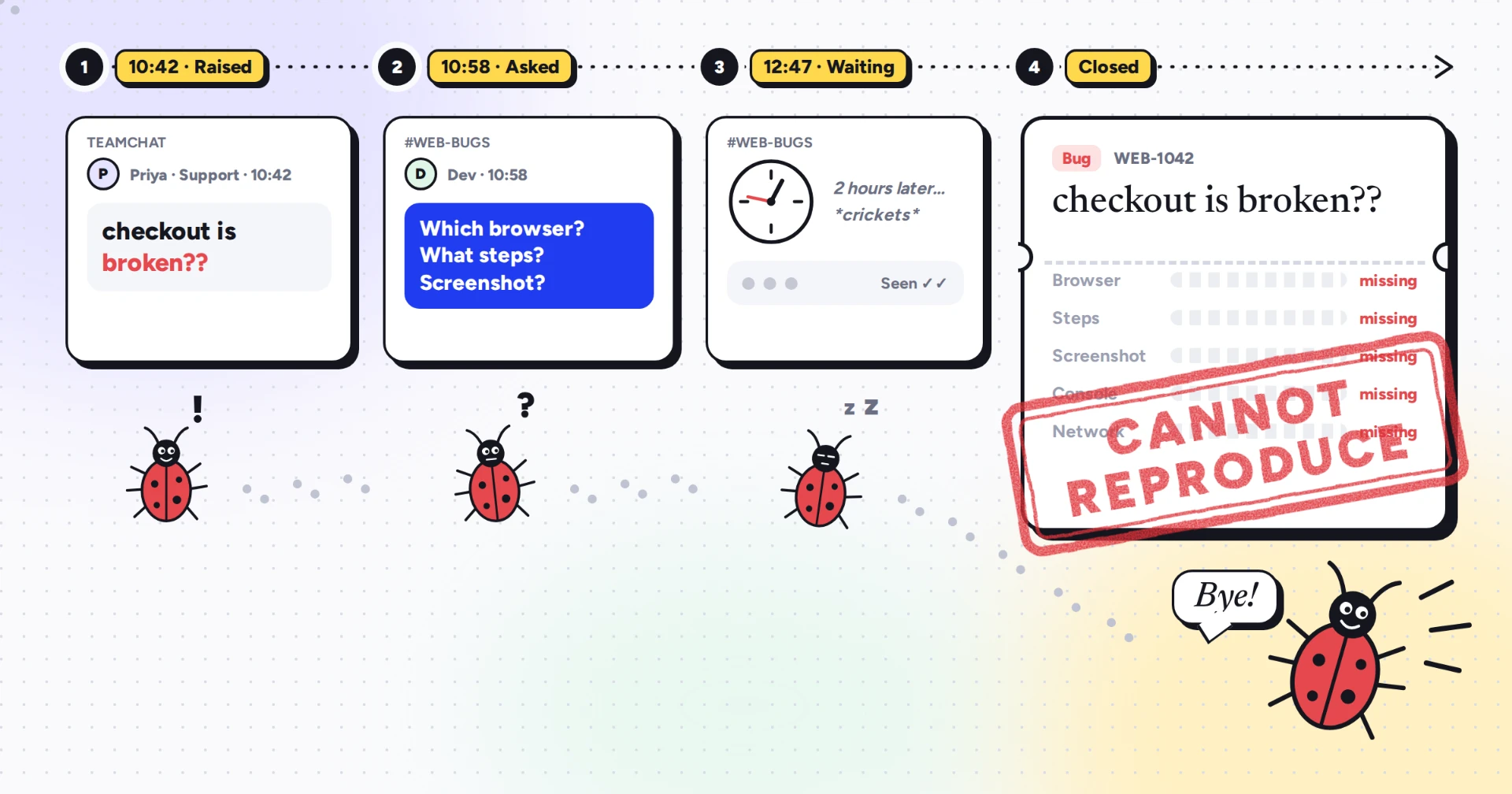
Three words that close a ticket without fixing anything. The bug was real. Someone saw it. Maybe a customer gave up on checkout because of it. The evidence just didn't make the trip from their screen to the developer's.
And here's the uncomfortable part: the bug is still there. It's simply waiting for the next customer.
What "cannot reproduce" really costs
On paper, it's one closed ticket. In practice, it's a chain reaction.
The developer stops what they're doing to investigate, then asks questions. The reporter has moved on and answers hours later, if at all. Someone schedules a call to "just show me". By the time anyone looks again, the page has reloaded, the console has cleared and nobody remembers what happened first.
Multiply that across a sprint and you get slower releases, frustrated testers who feel ignored, and developers who start to dread the bug queue. Worst of all, customers keep hitting a problem your team has officially decided doesn't exist.
The five things that get lost
Almost every "cannot reproduce" ticket is missing at least one of these.
- The environment. Safari, not Chrome. A 13-inch laptop, not a 27-inch monitor. A slow office Wi-Fi, not a fibre connection. Different setup, different bug, or no bug at all.
- The steps. "I clicked checkout" skips the coupon, the removed item and the back button that came first. Many bugs only appear after a specific sequence, and nobody remembers it once the moment has passed.
- What the browser saw. A console error. A request that came back with a 500. These clues are invisible to the reporter and gone after a refresh.
- The data. Some bugs only hit one user, one plan, one currency or one language. A developer testing with a clean test account will never meet them.
- The timing. Slow networks, race conditions, a flaky third-party service. Bugs that vanish the moment someone looks: the infamous Heisenbugs.
None of this is about careless reporters. People report what they see. Developers need what the browser saw.
A quick example
Picture a payment page that fails for some customers. Support reports "checkout is broken". The developer tries it in Chrome on a big monitor with a test card, and everything works. Ticket closed.
What went missing? The customer was on Safari on an iPhone, applied a discount code first, and the payment request returned a 500 because the discounted total had too many decimal places. Every one of those details was on the customer's screen. None of them made it into the ticket.
Developers: before you type "cannot reproduce"
Closing the ticket is tempting. Try these first.
- Stop testing like a developer. A clean test account on a fast office machine is the least realistic place to look. Try the report exactly as the reporter lived it.
- Ask for one thing, not five. A long list of questions rarely gets answered. Ask for the single piece of evidence you'd trust most.
- Check what your logs already know. Server logs and error monitoring often recorded the failure even when the reporter couldn't describe it.
- Park it, don't close it. Mark the ticket "needs evidence" and give it a deadline. Closing it too early tells everyone the bug is gone. It isn't.
Catching the bug that only happens sometimes
Intermittent bugs need a different approach, because you can't count on seeing them twice.
- Capture the moment, not the memory. Evidence collected while the bug is still on screen beats anything reconstructed from memory an hour later.
- Write down the time. An exact timestamp lets developers match the report against server logs.
- Look for the pattern. Same browser? Same account? Same time of day? Three reports with the same detail point straight at the cause.
The 7-point check before you hit "Create issue"
- ☐ The page URL
- ☐ Browser, OS and device
- ☐ Numbered steps
- ☐ What you expected
- ☐ What actually happened, with the exact error message
- ☐ A screenshot or recording
- ☐ Console errors and failed requests
Bonus point: who's affected, and how badly. One user or everyone? Blocking a payment or slightly misaligned?
Want it ready to copy? Grab our bug report template developers actually act on, or read what counts as a good bug report.
Or skip the checklist
Checklists work, but they ask a lot of people who aren't testers. Your PM, your designer, your support team and your clients shouldn't have to open DevTools to report a bug.
OneClik is a free Chrome and Edge extension that captures it all in one click: a screenshot or recording, console logs, network requests, and browser and OS details. It sends a ready-to-fix ticket to Jira, Linear or Slack, so nothing gets lost between the person who saw the bug and the person who has to fix it. Passwords and card numbers are masked before anything leaves the browser.
The reporter clicks once. The developer gets the evidence. The bug finally gets fixed.
Bugs don't get fixed. Evidence does.
Keep reading
AI Bug Triage in 2026: What Actually Works (and What Doesn't)
A practical, vendor-neutral guide to AI bug triage in 2026 - what works in production, where models still fail, and how to roll it out.
Read articleThe Bug Report Template Developers Actually Act On
A field-tested bug report template, with the seven fields developers care about, why most templates fail, and how to roll it out without slowing reporters down.
Read articleWhat Counts as a Good Bug Report (And Why Most Aren't)
A definition of a good bug report, the four reasons most fail, and what teams can change this quarter to fix it - without retraining a single reporter.
Read articleStop asking "can you reproduce this?"
One button inside your app captures the screenshot, console, network, and environment - a complete ticket, ready to send to Jira, Linear or Slack.